Develop Seed
Gabo Beaumont
US-5.1 —As an editor, I want to click on a document and access editing options so that I can quickly modify it or perform contextual actions on it.
The user clicks a subdocument to get into edit mode (same as clicking text)
The user can click the subdocument title at any time to open it.
The user can click the white area or the subdocument image at any time to select it.
The user can select more than 1 document at once and can copy document to paste it somewhere else
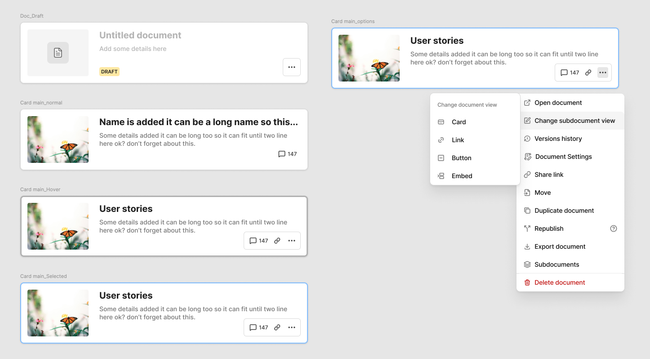
The user can hover over the document to understand if it is clickable.
The document just have 1 interaction which is click - no hover
User can access all the options related to a subdocument accessing a contextual menu (3 dots) with options when is selected.
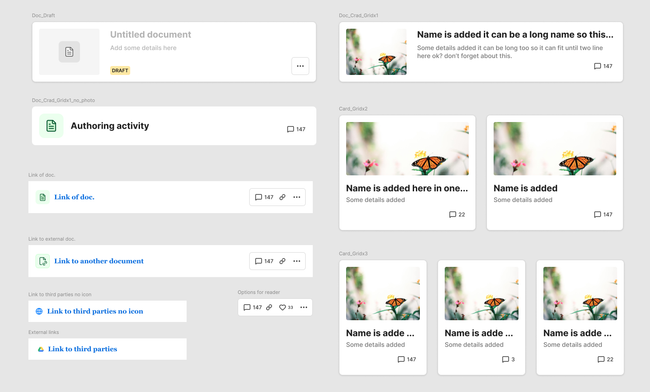
When a new document is created, keeps the horizontal format for the visualization→ Doc. draft
Error with the video file.
User clicks and opens a document.
User finds a subdocument inside the parent
User can click the link to share the document
User can open comments of the document
User can open contextual options of the document
User can edit view of the document by selecting the option on the list options
Keep cards horizontal but make the height shorter
When no image added we add a default document icon (see design)
We add a second line of text on the card format
I suggest to limit visualization options that are really useful
I suggest to differentiate between a link to an external doc. from a text/link visualization.
The user can change view of a subdocument at any time by selecting it and the contextual options (3 dots)
The user can select between different view options on Change subdocument view.
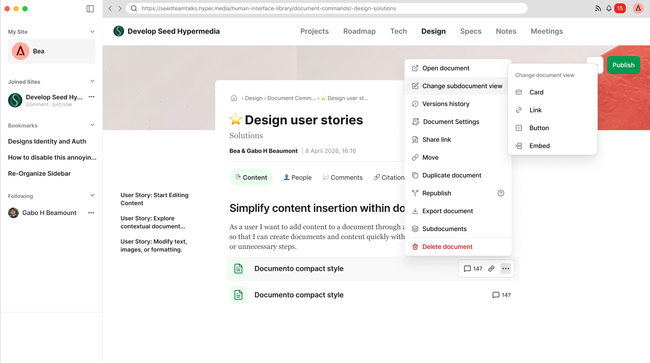
The user navigates the document and find subdocuments
The user clicks the 3 dots button to see options
The user selects the option change subdocument view
The user selects the options their prefer
The subdocument view is automatically updated
qa-report
Can we make the draft card look the same as the new Cards?   
Do you like what you are reading? Subscribe to receive updates.
Unsubscribe anytime