


(Photo by Miko Guziuk on Unsplash)
When we adopted Tamagui, our goal was ambitious but clear: build a unified UI component system that we could reuse across all platforms — Electron (desktop), Web (Remix), and eventually React Native for mobile. The dream of writing once and reusing everywhere was enticing, and early on, it felt like we were on the right track.
But reality hit us hard.
The Challenges We Faced
Despite the promising start, Tamagui proved difficult to set up in our monorepo environment. Performance issues crept in quickly, especially in our Remix-based web app. Tamagui doesn't offer solid support for Remix (if any at all), and integrating the two felt like forcing a square peg into a round hole.
I started suspecting Tamagui was the root cause of our web app’s sluggish performance — the DOM was bloated, and a huge chunk of JS was required just to handle styling. It wasn’t just a bottleneck — it was a full-blown blockade.
The most alarming issue? To get the web app running in development mode, you needed at least 96GB of RAM just to render something. That’s not a typo. For a TypeScript-based app, this is simply unacceptable.
Admitting Our Part in It
Now, I want to be fair — I don't blame Tamagui entirely. Part of the issue was on us. We didn’t take the time to fully understand the tool or optimize for it. As a startup, time is our most valuable currency, and we couldn’t afford to be stuck in a setup that made fast iteration impossible.
Setting a Plan in Motion
We decided it was time to migrate — but this wasn’t a decision we could approach lightly. A full rewrite on a separate branch would be out of sync within a week. We push code weekly and ship features regularly, so long-lived branches were a no-go.
Here’s the strategy that worked for us:
Merge that setup right away into the main branch.
Analyze which Tamagui components were used the most, and start migrating one component at a time, directly in main.
Continue adding new features, but build all new features using Tailwind + Shadcn.
Choosing Our New Stack
For styling, Tailwind was the obvious choice: fast, predictable, and built for performance. But for accessible components, we evaluated a few options — Radix UI, Ariakit, and others. In the end, we went with Shadcn because of the developer experience and the primitives were flexible and production-ready (Shadcn uses Radix under the hood).
Failed Attempts and What We Learned
We tried migrating page-by-page, but that quickly broke due to how tightly styling was coupled to Tamagui's layout logic.
Then we tried migrating one app at a time, but that failed too — we share UI components across both apps, and breaking one app to fix another wasn't a valid option.
Finally, we landed on a strategy that worked:
Migrate one “leaf” component (like Button, Tooltip, etc.) across the entire project and continue going up for more complex components.
This approach gave us visibility into how each component was being used, letting us standardize the API and catch edge cases early. It also made it easier to gradually phase out Tamagui without breaking large portions of the app.
Where We Are Now
We’re about 40% through the migration, and already seeing clear performance gains, especially on the web.
I also created a performance dashboard to help us track real improvements as we continue the migration. We’ll use this data to guide us and make sure the changes we’re making have tangible benefits.
Thanks for reading! This migration has been a tough but necessary move to keep our momentum as a startup. I’ll continue to share updates as we progress — and hopefully provide more insights for anyone considering a similar shift.
Update: 19/06/2025
I found another approach that it makes it easier to work with AI code agents: Sort all files that uses tamagui based on the Amout of "Tamagui usage".
Tamagui Usage is not only about how many imports are from the library but mainly how much tightly-coupled are with Tamagui and its API. I calculated the usage based on:
The amount of imports from tamagui the file has
The amount of props each component in that file have defined in any Tamagui Component
the more "logic" is defined inside Tamagui's API
I used AI to help me based on this metrics to create a "Tier Score" for each file that has anything imported from tamagui, and I got a list of files separated by 5-6 tiers.
The first 2-3 tiers were files that the AI agent could migrate by itself with no issues, I reviewed all the migration and it was very accurate.
The higher tiers are left. I'm now preparing the foundation in which I can migrate the more complex components to complete with the migration.
Update: 22/07/2025
Executive Summary
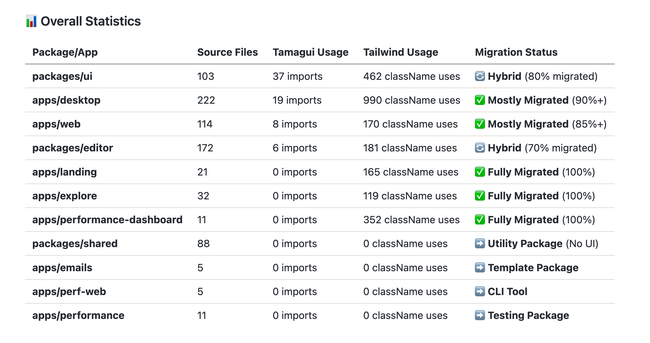
The frontend codebase is currently in a hybrid state with significant progress toward Tailwind CSS migration. Based on analysis of 784 source files across 11 packages/apps, approximately 75-80% of the UI layer has been migrated from Tamagui to Tailwind CSS.
🎯 Migration Progress Summary
Fully Migrated (100%): 3 apps (landing, explore, performance-dashboard)
Mostly Migrated (85%+): 2 apps (desktop, web)
Hybrid State (70-80%): 2 packages (ui, editor)
Utility/Non-UI: 4 packages (shared, emails, perf-web, performance)
Conclusion
The Tamagui to Tailwind migration is 75-80% complete with excellent progress in modern apps and core components. The remaining work is concentrated in the foundational UI package and some legacy components.
Estimated completion time: 1-3 weeks with focused effort on the UI package first, followed by systematic cleanup of remaining packages.
The migration has already delivered significant benefits in terms of modern tooling, bundle size, and developer experience for the newer applications. Completing the migration will provide a unified, maintainable styling system across the entire frontend codebase.
Do you like what you are reading? Subscribe to receive updates.
Unsubscribe anytime