


assignee:#Alex.
Outcome
User Stories
As a User, I sign up creating a new account from the desktop app.
I create the vault both in the desktop and web.
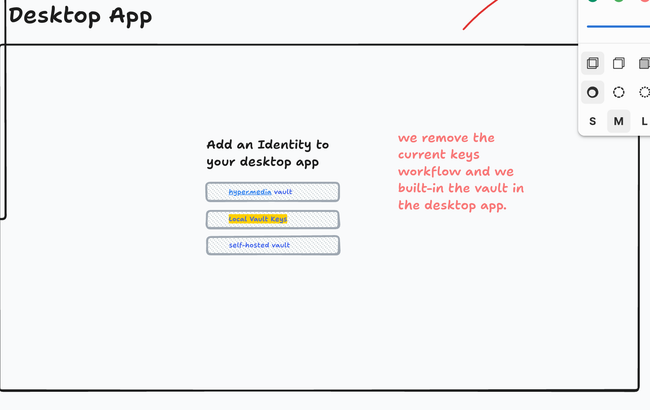
As a User, I sign in the desktop app with my existing Local vault.
Get automatically moved to the vault. and encourage to get a Web Vault.
Design for this
As a User, I have a Local Vault and I want to upgrade to Web Vault to use multi-device.
Design for this
Problem
Web Vault and desktop app keys are currently independent. Existing users of the desktop app are not aware of the existence of the vault, and have no easy way to use their existing keys on the web beyond manual export/import. Same is true the other way around — users who start on the vault have no easy way to reuse their identity in the desktop app.
Users should be able to seamlessly use their identity keys on the web and in the app.
Solution
Migrate existing key management in the desktop app to be vault-compatible. Having the vault server is still going to be optional, because we need to support existing users who already have their keys in the app, but the way keys are stored in the app would change to support easy merge with the online vault when users opt in.
From now on users will need to choose the "backend" for storing their keys. It can be local (similar to what we currently have), or remote (managed by us, or self-hosted by users).
The new local backend is similar to what we currently have, but the underlying data will be compatible with the remote vault for easier integration when users opt in. The migration will be automatic for the existing users.
Existing App Users
We need to guide existing users to configure their remote vault. We could show a toast or a banner, explaining them the benefits of having a remote vault (better multi-device and web experience).
It should always be possible to configure online vault in the settings if they choose to dismiss the banner.
TODO: design.
New App Users
New users of the app could be totally new, or they could be coming from the web, having their vault already.
During the app onboarding screen we should ask users whether they want to use local vault, or a remote one. They should be able to change their mind in settings.
TODO: design.
All or Nothing
When the user chooses their vault backend — all of their keys become managed by that backend. There will be no way to keep some of the keys locally, and some of the keys on the remote. Nor there will be a way to have multiple remote vaults connected. At least for now.
Upon the connection to the remote, if the user already has keys on one or both sides, the keys will get automatically merged without any loss (union merge).
Adding Keys
At any point in time a user can create or add more account keys. We keep the existing workflows for using BIP39 mnemonics, or using a previously exported key file.
Profiles vs. Home Documents
Currently when we create an account in the desktop app by default we create a home document (i.e. we create a site). We should be creating Profile instead, as sites are now optional. Also, Vault only relies on Profile metadata when rendering accounts, and doesn't render any home document or site-related information.
TODO: design.
App <-> Vault Authorization Flow
Currently the only client for the Vault API is our browser application. After authentication the server creates a session cookie and this is how the client stays logged in. Now that the daemon will also need to talk to the Vault API we need a way to authenticate it as well.
The idea is similar to the current key delegation flow, but instead of creating a capability for a session key we are going to create a secret, bound to the application requesting it, which will allow both authenticating with the vault server, and decrypting the vault data itself. Similar to a password, but better entropy.
It's important to note that this authentication flow is going to be browser-based — the user will click a button in the app and will be guided to the browser, where they would be able to create or sign in to their remote vault, and complete the authorization.
Roughly the flow will work like this:
User clicks a button in the desktop app.
Daemon creates an ephemeral secret for securing the comms between vault browser app and the daemon.
Browser gets opened, and the user logs in to their remote vault. The ephemeral session secret will be included here.
Consent screen will be displayed, explaining the user what's going on. This screen should probably be different from the one we have for session key delegation. This action is much more dangerous, so users must be very careful, understanding that they are delegating full access to their entire vault to a different application. TODO: design.
After consent, the vault browser app creates app-specific credential for the vault, and uses the ephemeral session secret to talk to the daemon on a localhost port to send this secret to the daemon. This assumes that the app and the browser are on the same machine. IMO fair constraint for now. We can improve later.
The daemon receives the secret, stores it in the OS keychain, authenticates to the vault API and downloads the vault data, decrypts it, and merges existing local keys if any exist.
The daemon periodically checks in with the vault server, to see if there's new data there.
To Do
Design call to action for existing users to set up their remote vault. If dismissed we shouldn't bug them anymore.
Design initial onboarding screen asking users to choose whether they want to use local vault or remote one (probably only managed for now, self-hosted later at some point). Ensure onboarding creates Profiles with sites being optional.
Design consent screen for vault <-> app authorization.
Refactor the existing vault API for better coherence. It's currently very ugly and all over the place. Now that this API will have another client, implementations could diverge and later changes can become complicated.
Implement vault API client on the daemon.
Implement the migration in the app from the current OS keychain to the new local vault approach.
Remove displaying mnemonic words in the app settings. It's not relevant anymore. We'll still support mnemonics for adding existing keys, but we don't need to save them or expose them. The actual private key is the data we care about, not the mnemonics.
Implement vault credentials that allow API access, not just vault decryption.
I added this notes and some UX basics to apply (TBC):
Do you like what you are reading? Subscribe to receive updates.
Unsubscribe anytime