


Photo by Lincoln Holley on Unsplash
The main purpose of this project is to remove the need of pushing a tag to create a new desktop release. This will improve the development workflow and experience when creating new app releases, making it easier to build and trigger new app versions by anyone in the team.
Current State Analysis
Desktop App Release Process
Production Releases:
Triggered by git tags matching *.*.* pattern (e.g., 2025.9.4)
Version locked to git tag via VITE_VERSION: ${{ github.ref_name }}
Build process:
Create git tag (e.g., 2025.9.4)
Push tag to trigger .github/workflows/release-desktop.yml
Builds for all platforms (macOS x64/arm64, Linux, Windows)
Publishes to GitHub Releases as prerelease
Generates latest.json via separate workflow when release is published
Dev Releases:
Triggered by schedule (weekdays at 8 AM UTC) or manual dispatch
Auto-generates versions: {latest-prod-tag}-dev.{increment} (e.g., 2025.9.4-dev.1)
Publishes to S3: s3://seedappdev/dev/
Includes auto-update support via update-electron-app
Current Version in package.json: 0.0.0 (placeholder, overwritten during build)
Web App Deployment
Current State:
Triggered by git tags (same as desktop)
Landing page deploys on push to main via SSH to hyper.media
Main web app deployment process unclear
Problems with Current Workflow
Tag-Version Lock Problem:
Each version permanently tied to git tag
Cannot update/republish version once tagged
Hotfixes require creating new version (2025.9.4 → 2025.9.5)
Hotfix Pain:
Bug in 2025.9.4 → Must create 2025.9.5
Another bug → Must create 2025.9.6
Minor fix → Must create 2025.9.7
Version numbers inflate quickly for patch fixes
Separate Workflows:
Different workflows for dev vs prod
Confusing to maintain and understand
Scheduled Dev Builds:
Daily builds even when no changes
Wastes CI resources
Proposed Solution: Channel-Based Release Flow
Core Concept
Decouple versions from git tags, using deployment channels and S3 as source of truth:
Version = Auto-calculated based on channel and latest S3 version
Channel = Where to deploy (dev or stable)
S3 JSON files = Source of truth for current versions (no git tag dependency)
Channel Strategy
Two channels only:
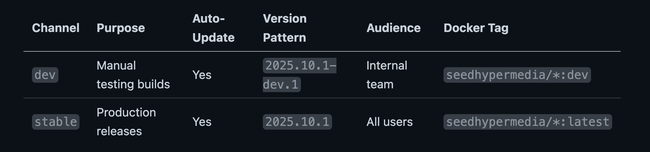
Version Strategy
Continue using CalVer: YYYY.M.PATCH
Stable Channel (Incremental within month, resets on month change):
October 2025:
  2025.10.1 → 2025.10.2 → 2025.10.3

November 2025 (month changes, patch resets):
  2025.11.1 → 2025.11.2

January 2026 (year changes):
  2026.1.1 → 2026.1.2
Dev Channel (Based on Stable):
Scenario 1: stable=2025.10.1, no dev version
→ dev=2025.10.1-dev.1

Scenario 2: stable=2025.10.1, dev=2025.10.1-dev.1
→ next dev=2025.10.1-dev.2 (increment)

Scenario 3: stable=2025.10.2, dev=2025.10.1-dev.3
→ next dev=2025.10.2-dev.1 (reset to new stable base)
Version NOT committed to package.json - Auto-calculated in GitHub Actions and set temporarily via scripts/set-desktop-version.mjs during build (same as current approach)
Architecture Changes
1. S3 Bucket Structure
Use seedreleases bucket with channel folders:
s3://seedreleases/
├── dev/
│   ├── latest/              # Mutable - always points to newest dev build
│   │   ├── latest.json
│   │   ├── RELEASES.json    # Contains current dev version
│   │   ├── SeedDev-2025.10.1-dev.5.dmg
│   │   └── ...
│   └── archive/             # Immutable historical dev builds
│       ├── 2025.10.1-dev.1/
│       ├── 2025.10.1-dev.2/
│       └── ...
└── stable/
    ├── latest/              # Mutable - current stable version
    │   ├── latest.json
    │   ├── Seed-2025.10.2.dmg
    │   └── ...
    └── archive/             # Immutable historical stable builds
        ├── 2025.10.1/
        ├── 2025.10.2/
        └── ...
2. Update Configuration Per Channel
Desktop apps read channel from build config:
// forge.config.ts
const IS_PROD_DEV = version.includes('dev')
const channel = IS_PROD_DEV ? 'dev' : 'stable'
const updateUrl = `https://seedreleases.s3.amazonaws.com/${channel}/latest/latest.json`
3. GitHub Releases (Stable Only)
Continue creating GitHub releases as prerelease
Git tag created AFTER successful build (not before)
Tag format: YYYY.M.PATCH (e.g., 2025.10.2)
Dev releases do NOT create GitHub releases or tags
Workflow Changes
ONE Unified Desktop Release Workflow
Updated workflow: .github/workflows/release-desktop.yml
Triggers: Manual dispatch only (no automatic tag-based releases):
on:
  workflow_dispatch:
    inputs:
      channel:
        type: choice
        options: [dev, stable]
        required: true
        default: 'dev'
Navigate to: Actions → Release - Desktop App (Unified) → Run workflow
Select:
Branch: main (or feature branch for testing)
Channel: dev or stable
Process:
Determine channel (from manual input)
Auto-calculate version:
Stable: Fetch latest from S3, check current date → increment or reset
Dev: Fetch stable + dev versions from S3 → increment or reset
Run tests and type checks
Set version temporarily in package.json via scripts/set-desktop-version.mjs (SAME AS CURRENT)
Build binaries for all platforms
Publish to S3 at s3://seedreleases/{channel}/latest/
Archive copy to s3://seedreleases/{channel}/archive/{version}/
Generate latest.json with download URLs
Update RELEASES.json (dev channel only)
If stable: Create git tag + GitHub prerelease (tag created AFTER build)
Web App Deployment (Docker Images)
Update existing Docker workflows for channel-based deployment:
Current workflows:
dev-docker-images.yml: Push to main → builds seedhypermedia/web:dev + other services
release-docker-images.yml: Tag push → builds seedhypermedia/web:latest + other services
Changes needed:
Both workflows continue working as-is (triggers unchanged)
Add version metadata to Docker images:
Dev: Use calculated dev version (e.g., 2025.10.1-dev.5)
Stable: Use calculated stable version (e.g., 2025.10.2)
Docker images built:
seedhypermedia/web:{dev|latest}
seedhypermedia/notify:{dev|latest}
seedhypermedia/site:{dev|latest} (backend daemon)
seedhypermedia/monitord:{dev|latest}
seedhypermedia/relayd:{dev|latest}
Web and desktop share same version - calculated once, used for both
Updated Release Processes
Scenario 1: Regular Stable Release (Manual Trigger)
# Current stable: 2025.10.1
# Goal: Release 2025.10.2

# 1. Merge changes to main
git checkout main
git pull
git push

# 2. Manually trigger release via GitHub Actions UI
# Navigate to: Actions → Release - Desktop App (Unified) → Run workflow
# Select:
#   - Branch: main
#   - Channel: stable

# 3. GitHub Actions automatically:
#    - Calculates next version (2025.10.2)
#    - Runs tests
#    - Builds for all platforms
#    - Publishes to S3 stable/latest/
#    - Archives to S3 stable/archive/2025.10.2/
#    - Creates git tag 2025.10.2
#    - Creates GitHub prerelease
#    - Updates latest.json

# 4. Users on auto-update get 2025.10.2

# Version automatically calculated based on:
# - Current date: 2025.10
# - Latest stable from S3: 2025.10.1
# - Result: 2025.10.2 (patch increment)
Scenario 2: Hotfix with Version Increment
# Current stable: 2025.10.2
# Critical bug discovered

# 1. Create hotfix branch
git checkout -b hotfix/critical-bug main

# 2. Fix the bug
# ... make changes ...
git commit -m "fix: critical bug"

# 3. Merge to main
git checkout main
git merge hotfix/critical-bug
git push

# 4. Manually trigger release
# GitHub Actions UI → Run workflow
#   - Branch: main
#   - Channel: stable

# 5. GitHub Actions automatically:
#    - Calculates version: 2025.10.3 (increments from 2025.10.2)
#    - Builds and releases
#    - Creates tag 2025.10.3
#    - Users get 2025.10.3 via auto-update
Scenario 3: Manual Dev Build for Testing
# Current stable: 2025.10.2
# Current dev: 2025.10.2-dev.4
# Want to test new feature

# 1. Merge feature to main
git checkout main
git merge feat/new-feature
git push

# 2. Manually trigger dev release
# GitHub Actions → Run release-desktop.yml
#   Input: channel = dev

# 3. GitHub Actions automatically:
#    - Calculates version: 2025.10.2-dev.5
#    - Builds for all platforms
#    - Publishes to S3 dev/latest/
#    - Archives to S3 dev/archive/2025.10.2-dev.5/
#    - Updates RELEASES.json with currentRelease: 2025.10.2-dev.5
#    - NO GitHub release created

# 4. Team tests 2025.10.2-dev.5 internally
Scenario 4: Stable Release After Dev Testing
# Current stable: 2025.10.2
# Current dev: 2025.10.2-dev.7
# Dev build tested and ready for stable

# Manually trigger stable release
# GitHub Actions UI → Run workflow
#   - Branch: main
#   - Channel: stable

# GitHub Actions automatically:
#   - Calculates version: 2025.10.3
#   - Builds and releases
#   - Creates tag 2025.10.3
#   - Creates GitHub prerelease

# Next dev build after stable 2025.10.3
# Will auto-calculate as 2025.10.3-dev.1 (reset)
Scenario 5: Month Change (CalVer Reset)
# Current date: October 31, 2025
# Current stable: 2025.10.3
# Current dev: 2025.10.3-dev.2

# === November 1, 2025 arrives ===

# Create first November release
git checkout main
git pull

# Manually trigger release
# GitHub Actions UI → Run workflow
#   - Branch: main
#   - Channel: stable

# GitHub Actions automatically:
#    - Detects current month (November = 11)
#    - Fetches latest stable from S3: 2025.10.3 (October)
#    - Resets patch to 1 for new month
#    - Version: 2025.11.1 ✓
#    - Builds and publishes
#    - Creates git tag 2025.11.1 AFTER build

# Next release in November
# Trigger workflow again → calculates 2025.11.2

# Next dev build after month change
# GitHub Actions UI → Run workflow
#   - Branch: main
#   - Channel: dev
# Calculates: 2025.11.1-dev.1 (reset to new month base)

# === January 2026 arrives ===

# First release of new year
# Trigger workflow → calculates 2026.1.1 (year and month change, patch resets)
Migration Plan (Multi-Phase)
Phase 1: Foundation
Goal: Update scripts and test version calculation logic
Validation:
Version calculation matches expected values for all scenarios:
Within same month: 2025.10.1 → 2025.10.2 ✓
New month: 2025.10.3 → 2025.11.1 (if Nov) ✓
New year: 2025.12.5 → 2026.1.1 (if Jan) ✓
Dev reset: stable=2025.11.1, dev=2025.10.3-dev.5 → 2025.11.1-dev.1 ✓
No breaking changes to existing workflows
Phase 2: Workflow Creation
Goal: Create unified release workflow alongside existing workflows
Validation:
Dev builds work correctly via manual trigger
Stable builds work via manual trigger
Version calculation from S3 works correctly
Both channels publish to correct S3 paths
Git tags created after successful builds (stable only)
No interference with existing workflows
Phase 3: Desktop Release Cut-Over
Goal: Switch production desktop releases to new workflow
Validation:
Stable release succeeds via manual trigger
Version calculated correctly from S3
All platforms build correctly
Auto-update works for end users
GitHub prerelease created correctly
Git tag created after build
Phase 4: Docker Image Integration
Goal: Update Docker workflows to use calculated versions
Validation:
Docker images built with correct version metadata
Web and desktop share same version number
Existing deployment mechanisms unchanged
All 5 services (web, notify, site, monitord, relayd) build successfully
Phase 5: Documentation & Training
Goal: Complete documentation and train team
Validation:
Team members can successfully trigger releases
Documentation covers all scenarios
Emergency procedures are clear
Phase 6: Cleanup
Goal: Remove old workflows and clean up
Validation:
Only new workflow in use
No references to old workflows in docs
Team comfortable with new process
Benefits Summary
For Development
✅ Unified workflow - One workflow for dev and stable, easier to maintain ✅ Faster dev testing - Manual trigger instead of scheduled, build only when needed ✅ Auto version calculation - No manual version management in package.json ✅ Clear separation - Dev vs stable clearly defined by channel
For Releases
✅ Manual control - All releases triggered manually (no tag dependency) ✅ Incremental versions - Stable versions always increment (2025.10.1 → 2025.10.2) ✅ Hotfix friendly - Just trigger workflow, version auto-calculated ✅ GitHub prereleases - Automatically created for stable releases ✅ Git tags as byproduct - Tags created after successful builds (not required)
For Operations
✅ Less CI waste - No scheduled builds, only on-demand dev builds ✅ Clear audit trail - S3 JSON files as source of truth, git tags optional ✅ Rollback ready - Previous versions archived in S3 ✅ Channel isolation - Dev and stable completely separate ✅ No git dependency - Version calculation entirely based on S3 state
Risk Mitigation
Risk 1: Version Calculation Error
Mitigation:
Extensive testing in Phase 1-2
Version calculation logged in workflow
Manual override possible via workflow_dispatch
Risk 2: Auto-Update Breakage
Mitigation:
Test auto-update in both channels before cut-over
Keep S3 structure compatible with existing update mechanism
Rollback plan: revert to old workflow if issues
Risk 3: S3 as Source of Truth
Mitigation:
Version calculation fails if S3 is unavailable (explicit error)
S3 JSON files are authoritative (not git tags)
Git tags created as byproduct of successful stable releases only
Risk 4: S3 Path Changes
Mitigation:
Maintain backward compatibility with existing paths
Gradual migration of users to new update URLs
Keep both old and new paths working during transition
Success Criteria
Phase 1-2 Success:
[x] Version calculation working correctly fetching from S3
[x] Dev builds successfully via manual trigger
[x] Stable builds successfully via manual trigger
[x] No git tag dependency for version calculation
[x] No impact on existing release process
Phase 3 Success:
[ ] First stable release (2025.11.1) completes successfully via new workflow
[ ] All platforms build and publish correctly
[ ] GitHub prerelease created automatically
[ ] Users receive auto-update without issues
Phase 4 Success:
[ ] Web deployment integrated with desktop releases
[ ] Correct environment variables per channel
[ ] Web and desktop versions in sync
Overall Success:
[ ] Team confident using new workflow
[ ] Zero production incidents from workflow change
[ ] Faster hotfix process demonstrated
[ ] Reduced CI costs from removed scheduled builds
Decisions Made
✅ S3 Bucket Strategy:
Use seedreleases bucket
Folders: /dev/ and /stable/
Add /archive/ subfolder to each for historical builds
✅ Web App Deployment:
Web uses existing Docker workflows
dev-docker-images.yml: Push to main → seedhypermedia/*:dev
release-docker-images.yml: Tag push → seedhypermedia/*:latest
No changes to deployment mechanism, just add version metadata
✅ Channel Count:
Two channels only: dev and stable
No beta channel for now
✅ Auto-Update Strategy:
Both dev and stable check for updates the same way
No changes to update checking mechanism
Only change: which S3 path to check (/dev/latest/ or /stable/latest/)
✅ Version Management:
Web and desktop share same version
Version calculated in GitHub Actions (not committed)
Set temporarily during build via scripts/set-desktop-version.mjs
Same approach as current workflows
✅ Version Mismatch Handling:
Workflow validates tag matches calculated version
Fails fast with clear error if mismatch
Shows expected version, actual tag, and instructions
✅ Dev Channel Access:
Manual trigger only (remove scheduled builds)
Restricted to team members via GitHub Actions permissions
Next Steps
✅ Review this proposal - Team discussion (you are here)
Answer open questions - Team decides on recommendations
Approve Phase 1 - Get sign-off to start implementation
Implement Phase 1 - Update scripts (Week 1-2)
Implement Phase 2 - Create workflows (Week 3-4)
Execute Phase 3 - Cut over desktop releases (Week 5)
Continue phases 4-6 - Web integration, docs, cleanup (Week 6-9
Questions
1. Does a tag gets added to the released code?
Yes. but the tag gets added AFTER the release is made. this happens when we create the release in Github.
2. Can we prevent release of code to the stable channel from another branch that is not main?
Yes. we can make sure the stable channel will only gets generated from the main branch.
3. Who can trigger workflows manually from Github?
Only maintainers or anyone with "Write" access to the repo. so is safe to rely on manual triggers (workflow_dispatch) on our repo. only Maintainers will be able to trigger releases.
Do you like what you are reading? Subscribe to receive updates.
Unsubscribe anytime